

Audit logs
Audit logs provide a chronological record of user and administrator actions in Synthesia, helping organizations monitor usage, detect anomalies, and demonstrate compliance.
Note:Only Organization Admins can access Audit Logs (via Organization Settings or Synthesia API).
Audit logs record actions taken across your organization and workspaces: who did what, when, and to what. Use them for security monitoring, compliance, and troubleshooting.
Access audit logs
Via the API
Query, search, and export audit log events programmatically. See the Audit Logs API reference.
From Organization settings
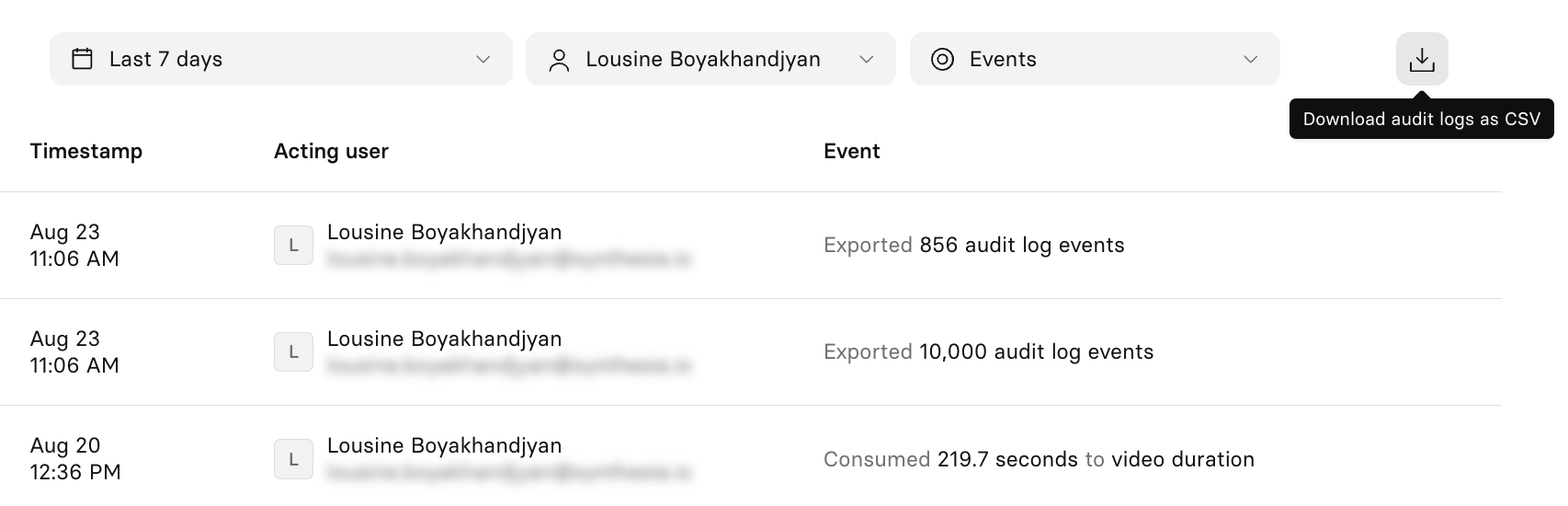
Go to Organization Settings > Audit logs to view events in the Synthesia app.
Filter the list by:
- Date range: Last 7 days, Last 30 days, Last 90 days, or Specific dates from a calendar picker.
- Acting user: search and select one or more users.
- Events: search and select one or more event types, or select All events.
The table shows each event's timestamp, acting user, and a plain-language description (for example, "Consumed 9 credits to nanobanana pro stock image generation," or "Logged out"). Select Load More to see older events.
Select a row to open its full JSON payload in a dialog, which you can copy to your clipboard.
Example payload:
{
  "id": "cea25bb2-2ebe-4c06-b622-9badfbb13974",
  "action": "billing.credits.consumed",
  "status": "success",
  "actor": {
    "type": "user",
    "id": "c421e4c4-e2f0-4797-893d-379ca9f3fe5e",
    "name": "Jamie Rivera",
    "email": "[email protected]"
  },
  "target": {
    "type": "workspace",
    "id": "30abbe50-7712-4fd8-9e01-a7df3e5528cb",
    "name": "Roleplay Sessions Space"
  },
  "context": {
    "workspaceId": "30abbe50-7712-4fd8-9e01-a7df3e5528cb",
    "organizationId": "495c6eb6-2dcc-49e9-8027-63e548068c9d",
    "ipAddress": "internal"
  },
  "details": {
    "feature": "VIDEO_DURATION",
    "amount": 219.749,
    "unit": "seconds",
    "operationType": "credit",
    "credits": null
  },
  "metadata": {
    "createdAt": "2026-08-20T16:36:48.879000Z",
    "processedAt": "2026-08-20T16:36:48.985000Z"
  }
}
Select Download CSV in the top-right corner to export the currently filtered list. Exporting is itself an audited action—see audit_logs.exported under Event types.
CSV structure
Exported files are named audit_logs_export_<YYYYMMDD>_<HHMMSS>.csv. A single export is capped at 10,000 events—if your filtered result has more, the file is truncated and _TRUNCATED is appended to the filename. Narrow your date range or filters to get the rest.
Each row has these columns:
| Column | Description |
|---|---|
event_id | Unique identifier for the event. |
timestamp | When the event occurred, in ISO 8601 (UTC). |
action | The event, in domain.resource.past_tense_verb format (for example, workspace.user.invited). |
actor_type | Who or what performed the action: user or system. |
actor_id | The actor's unique identifier. |
actor_name | The actor's display name. |
actor_email | The actor's email address. |
target_type | The kind of thing the action was performed on (for example, workspace, user, video, asset). |
target_id | The target's unique identifier. |
target_name | The target's display name. |
status | Whether the action succeeded, for example success. |
details | A JSON-encoded string with information specific to that action, such as what changed from and to. Quotes inside it are escaped and need unescaping before you parse it. |
workspace_id | The workspace the action occurred in, if applicable. |
organization_id | The organization the action occurred in. |
ip_address | The IP address the action came from. Blank for most user actions, and internal for actions performed by Synthesia's systems. |
Note:The CSV flattens the actor, target, and context objects from the JSON payload into individual columns, and uses a single
timestamprather than the JSON view's separatecreatedAtandprocessedAt.
Event structure
Each event records:
id: a unique identifier for the event.action: what was done, indomain.resource.past_tense_verbformat (for example,workspace.user.invited).status: whether the action succeeded.actor: who or what performed the action. Usually a user, but some actions are performed by Synthesia's systems (for example, the billing system) rather than a person.target: what the action was performed on (for example, a workspace, a user, or a video).context: the workspace, organization, and IP address the action occurred in.details: additional information specific to that action, such as what changed from and to.metadata: timestamps for when the event was created and processed.
Event types
Each event's Name is the label it appears under in the Events filter (see Access audit logs). A dash (—) means the event isn't available in the list of filter options.
Authentication
| Event | Name | Description |
|---|---|---|
user.authentication.login | User Authentication Login | A user logged in. |
user.authentication.logout | User Authentication Logout | A user logged out. |
User
| Event | Name | Description |
|---|---|---|
user.profile.updated | User Profile Updated | A profile field was updated. |
user.profile_picture.updated | User Profile Picture Updated | A profile picture was uploaded or deleted. |
user.email.changed | — | A user's email address was changed. Can be triggered by the user themselves, or automatically, for example by an SSO sync. |
user.account.banned | — | A user account was banned. |
user.api_key.created | User Api Key Created | An API key was created. |
user.scim.created | User SCIM Created | A user was created via SCIM provisioning. |
user.scim.updated | User SCIM Updated | A user was updated via SCIM provisioning. |
user.scim.deleted | User SCIM Deleted | A user was deleted via SCIM provisioning. |
user.jit.provisioned | User JIT Provisioned | A user was provisioned via Just-in-Time (JIT) provisioning. |
Workspace
| Event | Name | Description |
|---|---|---|
workspace.created | Workspace Created | A workspace was created. |
workspace.bound | Workspace Bound | A workspace was bound to an organization. Performed by Synthesia's systems, not a person. |
workspace.unbound | Workspace Unbound | A workspace was unbound from an organization. Performed by Synthesia's systems, not a person. |
workspace.deletion.scheduled | Workspace Deletion Scheduled | Workspace deletion was scheduled. |
workspace.name.changed | Workspace Name Changed | The workspace name was changed. |
workspace.icon.changed | Workspace Icon Changed | The workspace icon was uploaded or deleted. |
workspace.insights.requested | Workspace Insights Requested | An Insights report was requested. See Insights. |
workspace.preferences.updated | Workspace Preferences Updated | A workspace setting was changed, covering most toggles in Workspace settings. |
workspace.joining_strategy.updated | Workspace Joining Strategy Updated | The workspace's discoverability setting was changed (for example, between invitation-only and open for anyone from listed domains). |
workspace.invite_link.updated | Workspace Invite Link Updated | The workspace's invite link was turned on or off. |
workspace.invite_link.reset | Workspace Invite Link Reset | The workspace's invite link was reset, invalidating the old one. |
workspace.share_page_colors.updated | Workspace Share Page Colors Updated | The share page's primary, secondary, or background color was changed. |
workspace.share_page_logo.updated | Workspace Share Page Logo Updated | The share page logo was uploaded or deleted. |
workspace.user.invited | Workspace User Invited | A user was invited to the workspace. |
workspace.invitation.accepted | Workspace Invitation Accepted | A workspace invitation was accepted. |
workspace.invitation.revoked | Workspace Invitation Revoked | A workspace invitation was revoked. |
workspace.user.role_changed | Workspace User Role Changed | A user's role in the workspace was changed. |
workspace.user.removed | Workspace User Removed | A user was removed from the workspace. |
workspace.user.left | Workspace User Left | A user left the workspace voluntarily. |
workspace.license.changed | Workspace License Changed | A user's license in the workspace was changed. |
workspace.license.consumed | Workspace License Consumed | A user's license in the workspace was upgraded to Full. |
workspace.license.released | Workspace License Released | A user's license in the workspace was downgraded to Restricted. |
Organization
| Event | Name | Description |
|---|---|---|
organization.created | — | An organization was created. |
organization.name.changed | Organization Name Changed | The organization name was changed. |
organization.preferences.updated | Organization Preferences Updated | An organization setting was changed, covering most toggles in Organization settings. |
organization.workspace_discoverability_domain.added | Organization Workspace Discoverability Domain Added | An allowed domain was added for workspace discoverability. |
organization.workspace_discoverability_domain.removed | Organization Workspace Discoverability Domain Removed | An allowed domain was removed from workspace discoverability. |
organization.sso_settings.updated | Organization SSO Settings Updated | Organization SSO settings were updated. |
organization.invitation.resent | Organization Invitation Resent | An organization invitation was resent. |
organization.invitation.revoked | Organization Invitation Revoked | An organization invitation was revoked. |
organization.user.role_changed | Organization User Role Changed | A user's role in the organization was changed. |
organization.user.removed | Organization User Removed | A user was removed from the organization. |
organization.license.changed | Organization License Changed | A user's license in the organization was changed. |
organization.license.consumed | Organization License Consumed | A user's license in the organization was upgraded to Full. |
organization.license.released | Organization License Released | A user's license in the organization was downgraded to Restricted. |
organization.insights.requested | Organization Insights Requested | An Insights report was requested. See Insights. |
Billing
| Event | Name | Description |
|---|---|---|
billing.credits.consumed | Billing Credits Consumed | Credits were consumed by a feature. |
billing.credits.allocated | Billing Credits Allocated | Credits were allocated to a workspace. |
billing.credits.added | Billing Credits Added | Credits were manually granted to an account, for example by Synthesia support. |
billing.credits.purchased | Billing Credits Purchased | Credits were purchased. |
billing.credit_allocation_strategy.changed | Billing Credit Allocation Strategy Changed | The organization's credit allocation strategy was changed, between a shared pool across all workspaces and per-workspace allocation. See Enforce workspace limits. |
billing.workspace_allocation.updated | Billing Credits Allocation Updated | A workspace's specific credit allocation amount was changed. See Allocated credits by workspace. |
Email send cap
| Event | Name | Description |
|---|---|---|
email_send_cap.recipient_exclusion.granted | Email Send Cap Recipient Exclusion Granted | A recipient was excluded from the email send cap. |
email_send_cap.recipient_exclusion.revoked | Email Send Cap Recipient Exclusion Revoked | A recipient's exclusion from the email send cap was revoked. |
Content
| Event | Name | Description |
|---|---|---|
dubbing.project.created | Dubbing Project Created | A dubbing project was created. |
asset.powerpoint.uploaded | Asset Powerpoint Uploaded | A PowerPoint file was imported. |
scorm.package.downloaded | — | A SCORM package was downloaded. |
Integrations
Covers HRIS and messaging integrations for the Learner Portal, and other external tool connections.
| Event | Name | Description |
|---|---|---|
integrations.connection.initiated | — | A connection to an external tool was started. |
integrations.connection.created | — | A connection to an external tool completed successfully. |
integrations.connection.deleted | — | A connection to an external tool was disconnected. |
Audit logs
| Event | Name | Description |
|---|---|---|
audit_logs.exported | Audit Logs Exported | An audit log export was requested. |
Learner Portal
The Learner Portal has its own set of events, covering Learner Groups, content assignment, and role entitlements. These are distinct from the core Admin/Member/Guest model—the Learner Portal has its own roles (Enablement Admin, Organization Admin, Manager, and Learner).
| Event | Name | Description |
|---|---|---|
entitlement.granted | — | A Learner Portal role (for example, Enablement Admin) was granted to a user. |
entitlement.revoked | — | A Learner Portal role was revoked from a user. |
lms.hris_sync_config.created | LMS Hris Sync Config Created | An HRIS sync was connected. See Integrations. |
lms.hris_sync_config.updated | LMS Hris Sync Config Updated | An HRIS sync's configuration was changed. |
lms.hris_sync_config.deleted | LMS Hris Sync Config Deleted | An HRIS sync was disconnected. |
lms.learner_group.created | LMS Learner Group Created | A Learner Group was created. Groups are either manual (fixed membership) or dynamic (populated automatically based on rules, for example department or email domain). |
lms.learner_group.updated | LMS Learner Group Updated | A Learner Group's name or targeting rule was changed. |
lms.learner_group.deleted | LMS Learner Group Deleted | A Learner Group was deleted. |
lms.learner_group_member.added | LMS Learner Group Member Added | A learner was added to a Learner Group. |
lms.learner_group_member.removed | LMS Learner Group Member Removed | A learner was removed from a Learner Group. |
lms.assignment_target.added | — | A learner was assigned a Roleplay Session. |
lms.assignment_target.removed | — | A learner's assignment to a Roleplay Session was removed. |
Updated about 2 months ago