---
updatedAt: 2026-10-08T16:28:11.000Z
agentTools:
projectIndex: https://docs.synthesia.io/llms.txt
---
# Billing & Usage
Manage your Synthesia billing and usage.
See your plan's usage and credits, manage payment details, and, for Enterprise plans with an organization structure, allocate credits across your organization's workspaces.
Plan usage, management, credits, upgrading or downgrading, and payment methods.
Credits and billing for an Enterprise account without an organization.
Credit allocation across workspaces, and organization-level billing.
## Self-serve billing
Navigate to `Settings` > `Billing` to see your plan details and usage.
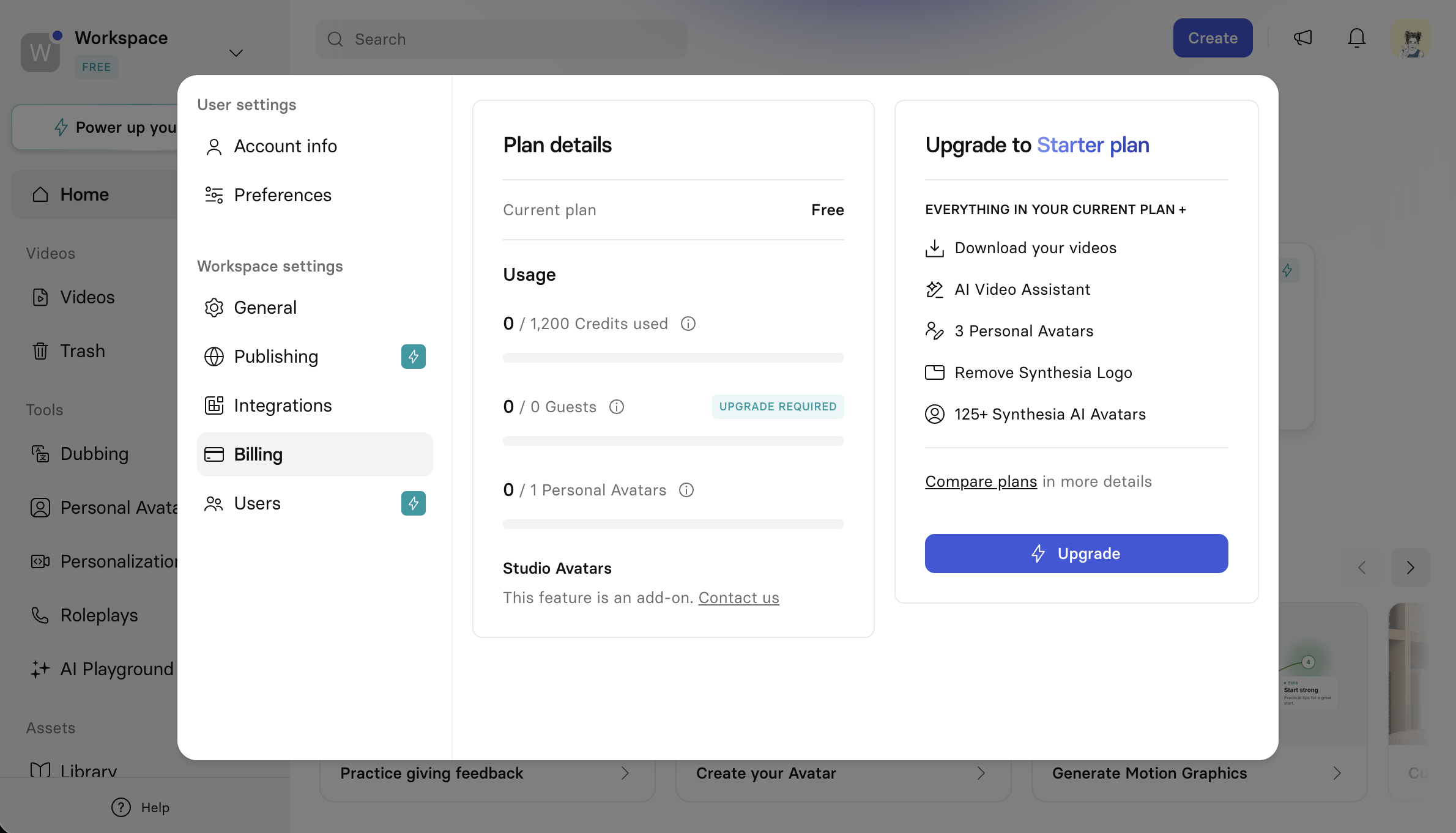
**Plan details** shows your current plan.
**Usage** shows how much of your plan's quotas you've used:
* **Credits**: the shared usage currency consumed by video generation, dubbing, personalization, and AI-generated stock content. Resets each billing period. Learn more about how [credits work on self-serve plans](https://help.synthesia.io/en/articles/11972627-what-are-credits-and-how-do-they-work-on-self-serve-plans).
* **Guests**: how many guest collaborators you can invite to videos.
* **Personal Avatars**: how many personal avatars you can create.
**Studio Avatars** are a separate add-on, available by contacting Synthesia, and aren't counted against the usage quotas above.
### Usage alerts
If you're approaching your plan's credit quota, Synthesia shows a usage alert in the main menu, and again when generating a new video. If you don't have enough credits to generate a new video, the generation fails and an error is displayed.
### Plan management
Access your billing information from `Settings` > `Billing`, where you can:
* Change or cancel your plan.
* Change your payment method, billing address, or VAT information.
* See previous invoices.
### Change or cancel your plan
On Starter and Pro plans, select the `...` menu on the Plan details card, in `Settings` > `Billing`:
* **Change plan**: upgrade or downgrade your plan. See the [Synthesia pricing page](https://www.synthesia.io/pricing-options) for all available plans.
* **Cancel subscription**: cancel your plan.
* **Manage billing details**: update your payment method, billing address, and VAT information, and see previous invoices.
See [How do I manage my Synthesia plan and billing?](https://help.synthesia.io/en/articles/15972027-how-do-i-manage-my-synthesia-plan-and-billing) for more detail.
### Payment methods
* **Starter and Pro plans**: major debit and credit cards, and PayPal.
* **Enterprise plans**: credit cards and bank/wire transfers.
Synthesia doesn't accept cryptocurrency or other alternative payment methods. If you're experiencing payment issues, including double charges or trouble changing a payment method, contact the Synthesia support team.
## Enterprise billing (Workspace)
Applies to Enterprise accounts that aren't grouped under an [organization](https://docs.synthesia.io/docs/organization-settings). Each workspace manages its own plan, license preferences, and credits independently—there's no cross-workspace credit allocation in this case.
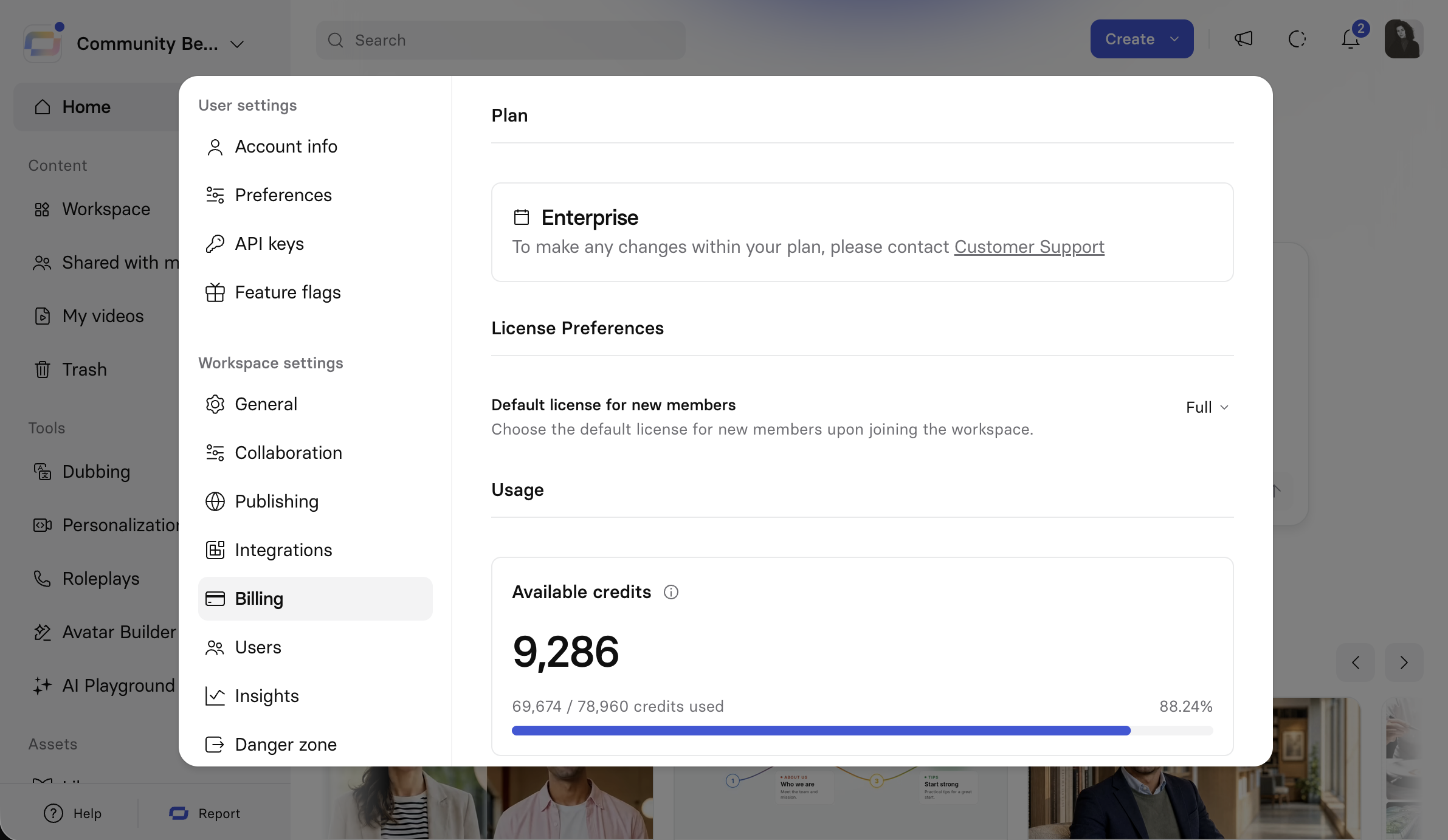
Navigate to `Settings` > `Billing`, under Workspace settings.
### Plan
Shows your current plan. To make changes to an Enterprise plan, contact Customer Support.
### License Preferences
**Default license for new members**: the license assigned to new members when they join the workspace. Choose **Full**, **Free**, or **Restricted**.
### Usage
**Available credits** shows the workspace's total remaining credits, and how many of its total credits have been used.
## Enterprise billing (Organization)
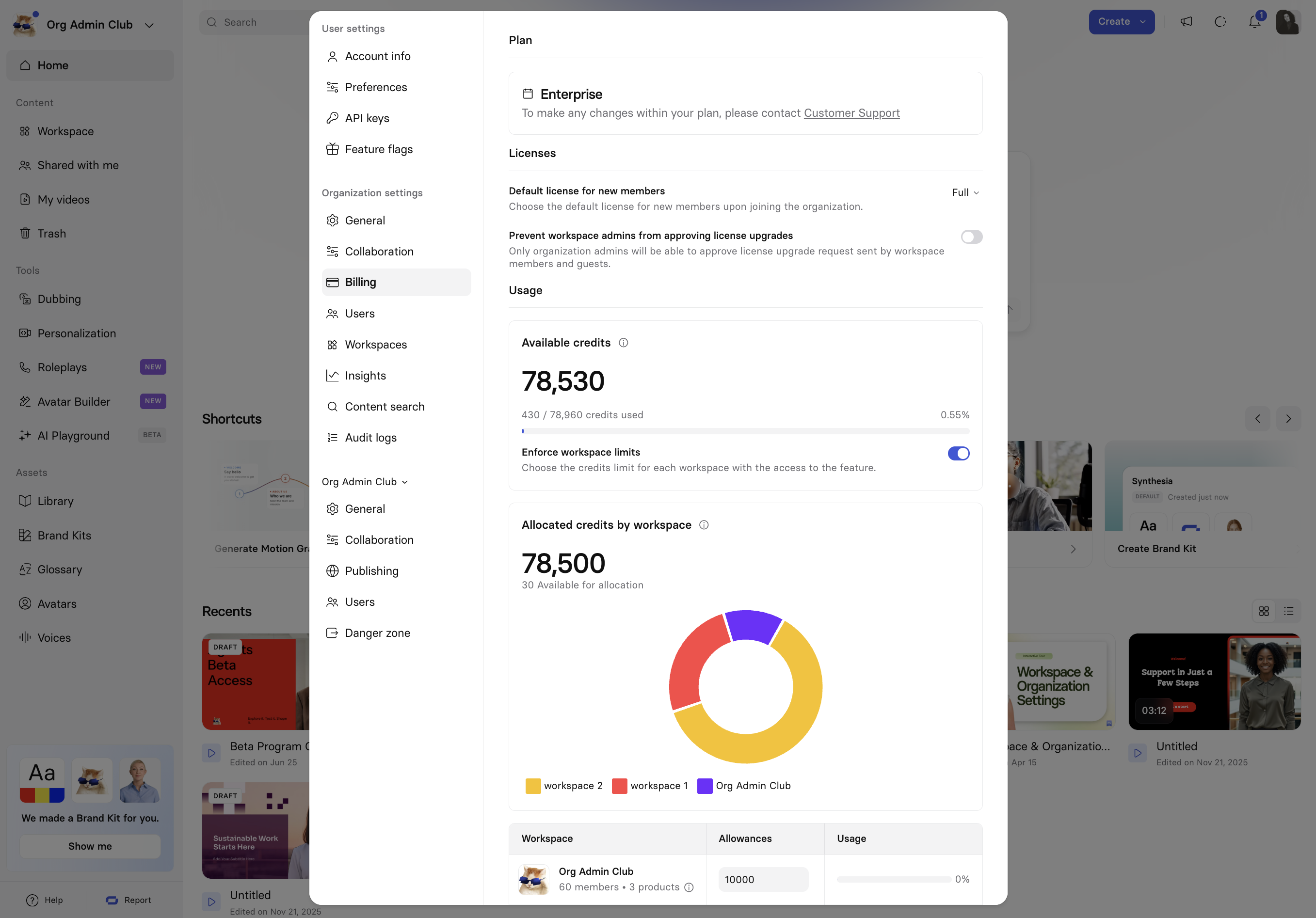
Navigate to `Settings` > `Billing`, under Organization settings, to manage plan, licenses, and credits for the organization. Learn more about how [credits work for Enterprise customers](https://help.synthesia.io/en/articles/11825466-what-are-credits-and-how-do-they-work-for-enterprise-customers-in-synthesia#h_98a8cc32d2).
### Plan
Shows your current plan. To make changes to an Enterprise plan, contact Customer Support.
### Licenses
* **Default license for new members**: the license assigned to new members when they join the organization. Choose **Full**, **Free**, or **Restricted**.
* **Prevent workspace admins from approving license upgrades**: when on, only organization admins can approve license upgrade requests sent by workspace members and guests.
### Usage
**Available credits** shows the organization's total remaining credits, and how many of its total credits have been used. Learn how to view [how credits are being used across your organization's workspaces](https://docs.synthesia.io/docs/organization-settings#insights).
**Enforce workspace limits** controls how that credit pool is divided:
* **Off** (default): all workspaces draw from the same shared pool of available credits, arbitrarily.
* **On**: reveals **Allocated credits by workspace**, showing how many credits have been allocated out of the total available, and a breakdown by workspace: a donut chart, and a table listing each workspace's member count, enabled products, credit allowance, and usage.
To allocate credits to a workspace, enter a number directly into its **Allowances** field in the table. The donut chart, the allocated credits total, and the credits still available for allocation all update as you type.
### Important:
Turning Enforce workspace limits off, then back on, resets every workspace's allocation to 0—you'll need to re-allocate credits to each workspace from scratch.
### Note:
There are no product-level credit controls—an organization admin can't allocate credits to a specific product, like AI Dubbing.
Instead, admins enable specific products (for example, AI Dubbing, Bulk personalized videos, or Veo3 stock footage) for a workspace, then allocate that workspace a single credit pool shared across all of its enabled products.
If a workspace has multiple products enabled, any one of them can consume from that entire shared pool—credits aren't ring-fenced per product within a workspace.
# Sibling pages
* [User settings](https://docs.synthesia.io/docs/user-settings.md)
* [Organization settings](https://docs.synthesia.io/docs/organization-settings.md)
* [Workspace settings](https://docs.synthesia.io/docs/workspace-settings.md)
* [Developers](https://docs.synthesia.io/docs/developers.md)
* [Synthesia SSO](https://docs.synthesia.io/docs/synthesia-sso-guide.md)
* [User roles & permissions](https://docs.synthesia.io/docs/user-roles-and-permissions.md)
* [User licenses](https://docs.synthesia.io/docs/user-licenses.md)
* [Audit logs](https://docs.synthesia.io/docs/audit-logs.md)
* [Synthesia integrations](https://docs.synthesia.io/docs/synthesia-integrations.md)
# What’s Next
* [User settings](https://docs.synthesia.io/docs/user-settings.md)
* [Video Creation](https://docs.synthesia.io/docs/video-creation.md)
* [Video Edit page](https://docs.synthesia.io/docs/video-edit-page.md)
* [User licenses](https://docs.synthesia.io/docs/user-licenses.md)